Subject

hp (8) hpbsm (8) omi (8) bsm (7) hpom (6) om (5) hpomi (3) apm (2) oracle (2) agile (1) automation (1) create (1) extremeprogramming (1) hpma (1) hpomima (1) ma (1) monitoring (1) monitoringautomation (1) opr-agt (1) opr-jobs (1) plsql (1) privillege (1) programming (1) role (1) tablespace (1) user (1) xp (1)

Jumat, 10 April 2015

HP OMi 10: Trust relationship with HP Operation Manager for Linux

If you read the documentation about how to configure trust relationship between HP OMi and HP OML , it look complicated.
Too many line need to read, since that documentation build with some condition, like if you have old version of HPOM.

But with current new OM version that will be simple step:

  1. Run on OMi
  2. <OMi_HOME>/opr/bin/BBCTrustServer.sh|bat <oml_target_server>


    at the end of command result, option to Add CA certificate will be ask, then type y, press enter.

  3. Run on OML
  4. /opt/OV/bin/BBCTrustServer.sh <OMi_Target_server>


    Similarly, type y and press enter.
  5. Check the result  
Use command bbcutil -ping <target_server> to check the connection.
Do it from OMi and OML and status must be OK.


Rabu, 08 April 2015

HP OMi 10: opr-agt setting up agent configuration (example 2)

opr-agt example agent setting

On the Operation Agent, you can use command ovconfget to display the agent setting and ovconfchg to set specific agent setting.

on the Operation Manager, you also have an option to use opcragt for remotely collect agent information or setting agent.

On the OMi 10, opr-agt also has similar option: -get_config_var and -set_config_var

get_config_var

you need to supply the specific name space to collect agent information.

set_config_var

Following example, the command set the agent config on eaagt name space, then check the result using get_config_var

Hope it helpful, and please write the comment for further question.


HP OMi 10: opr-agt check the agent status, version, stop and start (example 1)

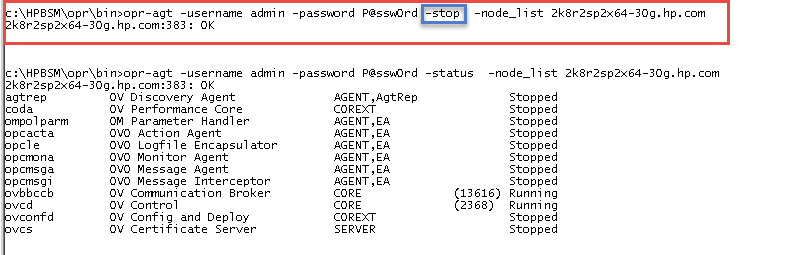
Example 1. opr-agt command to see status, version and stop-start agent


  1. Agent identity must use primary DNS name of agent registration on the RTSM
  2. Agent control process(ovcd) /bbc (ovbbcb) must be running on the agent, or following error will be raised.
  3. If connection establish, agent status will be displayed:
  4. Check agent version: 
  5. Stop the agent then see the status:
  6. Start the agent and see the status:


Hope it is helpful.


HP OMi 10: opr-agt TARGET option

TARGET option

-query_name <query_name> | -view_name <view_name> | -filter_name <filter_name> | -node_list <node_list> [-dont_check_database] | -node_group <node_group> | -all


Option
Description
{‑query_name|‑qn} <query_name>
Performs the operation on monitored nodes selected by the specified TQL query.
{‑view_name|‑vn} <view_name>
Performs the operation on monitored nodes selected by the specified view.
{‑filter_name|‑fn} <filter_name>
Performs the operation on a list of monitored nodes with the HP Operations Agent installed that was obtained by applying the node filter.
{‑node_list|‑nl} <node_list> [-dont_check_database|-nodb]
Performs the operation on a list of one or more monitored nodes. The nodes must exist in the RTSM and must be associated with a CI of the type om_operations_agent.
Separate multiple nodes with commas (for example, node1.example.com,node2.example.com).
If used with the -dont_check_database option, the operation on the nodes is performed without checking if the nodes exist in the RTSM.
{‑node_group|‑ng} <node_group>
Performs the operation on a group of monitored nodes. A node groups is a CI collection containing hosts. Node groups can be maintained in the Monitoring Automation Node Editor or they can be imported through topology synchronization from HPOM to OMi.
The nodes must exist in the RTSM and be associated with a CI of the type om_operations_agent.
Specify node groups by their names or their paths (the latter applies to hierarchical node groups imported from HPOM for Windows).
-all
Performs the operation on all monitored nodes that have the HP Operations Agent installed (that is, nodes that are associated with a CI of the type om_operations_agent).

Selasa, 07 April 2015

HP Omi 10: opr-agt OPERATION option

OPERATION Option

Please follow this link for general description of opr-agt
Syntax
( (-status | -start | -restart | -stop) [-comp <component> ] | -set_primary_manager [-manager <NewManagerHostname>] | [-switch_manager [-manager <NewManagerHostname> -manager_id <NewManagerId>] (-set_config_var | -clear_config_var | -get_config_var) <setting> | -agent_version | -list_policies) ) [-num_parallel] | -list_agent_nodenames | -deploy [-force | -clean]

Option
Description
{-agent_version|-av}
Lists the HP Operations Agent packages that are installed on the monitored node. The output includes the package name, description, version, and platform.
{-list_agent_nodenames|-lan}
Returns a list of monitored nodes that match the target selection.
{-list_policies|-lp}
Lists the policy templates that are deployed to the monitored node.
{-num_parallel|-np} <number>
Sets the maximum number of monitored nodes that opr-agt can contact in parallel.
Default value is: 50.
{-clear_config_var|-ccv <namespace>:[<variable>]}
Deletes the specified HP Operations Agent configuration setting in the specified namespace. When you omit the variable, the tool deletes all settings in the specified namespace.
{-get_config_var|-gcv <namespace>:[<variable>]}
Retrieves the specified HP Operations Agent configuration setting in the specified namespace. When you omit the variable, the tool retrieves all settings in the specified namespace.
{-set_config_var|-scv} <namespace>:<variable>=<value>
Sets the HP Operations Agent configuration variable to the specified value.
The <value> to set may not contain colons (:) or parentheses (()).
{-set_primary_manager|-primmgr} [-manager <NewManagerFQDN>]
Sets the primary manager for event reception (primary event receiver) of an agent to the current OMi server.
Used with the [-manager <NewManagerFQDN>] option, this option sets the primary event receiver to the value of <NewManagerFQDN>, which is the fully qualified domain name (FQDN) of the new primary event receiver. In distributed environments, it is the FQDN of the gateway server or a load balancer.
This option must be used in conjunction with one of the available <targets> options.
Be aware that the [-manager <NewManagerFQDN>] option should be used with care. Specifying incorrect values can result in serious communication problems, as the events will not reach the server and will therefore be buffered on the agent.
{-switch_manager|-swm} [-manager <NewManagerFQDN> -manager_id <NewManagerCoreID>]
Changes the primary manager of the target hosts to the current OMi server. Note that using this option unsets the primary event receiver (if OPC_PRIMARY_MGR is set). Subsequent events will be received by the server from which the command was run.
Used with the [-manager <NewManagerFQDN>] and [-manager_id <NewManagerCoreID>] options, it changes the primary manager to the values specified in <NewManagerFQDN> and <NewManagerCoreID>.
Specify the long hostname of the new primary manager as <NewManagerFQDN> and its core ID value as <NewManagerCoreID> (you can get the server ID by running the ovcoreid –ovrg server command).
This option must be used in conjunction with one of the following <targets>: -query_name, -view_name, -node_list, -node_group. Note that it cannot be used with the -all option.
Be aware that the [-manager] and [-manager_id] options should be used with care. Specifying incorrect values can result in serious communication problems between the server and the agents.
{-status_agent|-status} | {-start_agent|-start} | {-restart_agent|-restart} | {-stop_agent|-stop} [-comp <component>]
Displays the status of, starts, restarts, or stops all HP Operations Agent processes. The processes ovcd and ovbbccb are not started or stopped.
The optional -comp option enables you to specify individual agent processes or a group of processes (for example the action agent process opcacta or the process group AGENT). To specify multiple processes, separate each process with a comma (for example, opcacta,opcmsga, opcle).
{-deploy|-d} [-force | -clean]
Deploys the configuration to target hosts.
Used with the -force option, it redeploys the full configuration (policy templates and instrumentation). If this option is not set, only the configuration that was not yet delivered to the HP Operations Agent is deployed.
Used with the -clean option, it removes all template policies from the target hosts before redeploying the configuration.
Note that this option must be used in conjunction with one of the available <targets> options.

HP Omi 10: remote agent operation opr-agt command - General

The opr-agt Command-Line Interface

You can use the opr-agt command-line interface (CLI) to manage and configure the HP Operations Agent on one or more monitored nodes:

  • Get the current status of the agent processes.
  • Start or restart the agent processes.
  • Shut down (stop) the agent processes.
  • Return the version number of the installed HP Operations Agent software.
  • Return the setting of configuration variables.
  • Set configuration variables to a specified value.
  • Switch the primary manager.
  • Deploy configuration.
  • Sets the primary manager for event reception (primary event receiver)
This command equivalent to opcragt on the HP Operation Manager.


The opr-agt command-line interface first contacts the RTSM to retrieve a list of monitored nodes. It then contacts up to 50 nodes in parallel to perform the requested operation. When you run an operation on more than one monitored node, opr-agt displays the status immediately after a remote operation finishes for each node. 

You can run opr-agt on a gateway or a data processing server. On the server, the server processes must be running, and the ovcd and ovbbccb processes must be running on the monitored node.

Location

<OMi_HOME>/opr/bin/opr-agt 

Synopsis

opr-agt <BSM_CONNECTION> <operation> <targets> <authentication> <toolInfo> 

Please follow the below link to see more detail explanation for each option:


HP OMi 10: opr-agt BSM_CONNECTION option

BSM_CONNECTION Option

Please follow this link for general description of opr-agt

Syntax:
-username <login name> -password <password> ([-port <port>] [-server <GatewayServer> [-ssl] | -url <url>]) [-customer <customer ID>]

Note: If <BSM_CONNECTION> is omitted, the command is executed on the server to which you are logged on.

Option
Description
{-username|-user} <login name>
Sets the login name of the user required to execute CLI operations on the target gateway server.
{-password|-pw} <password>
Sets the password for the specified user.
Default value: empty string
{-port|-p} <port>
Uses port <port> to connect to the target gateway server.
Default value of <port>:
80 for HTTP connections
443 for HTTPS connections
-server <GatewayServer>
Sets the target gateway server, using <GatewayServer> as the hostname or IP address to locate it.
Default value of <GatewayServer>:
FQDN of the OMi gateway server
-ssl
When this option is specified, the HTTPS protocol is used to connect to the target gateway server. If omitted, the HTTP protocol is used.
Cannot be used in conjunction with the -url option.
{-url|-u} <url>
Sets the target gateway server, using <url> as the URL to locate it.
Default value of <url>:
http://<OMi gateway FQDN>:80/opr‑config‑server/rest
{-customer|-cu} <customer ID>
Sets the identification number associated with a particular customer.
Default value: 1

Only applicable if you have multi-tenancy on the RTSM.